


Changing your TYPO3 password
Once you have logged in TYPO3, you can change your password at any time.
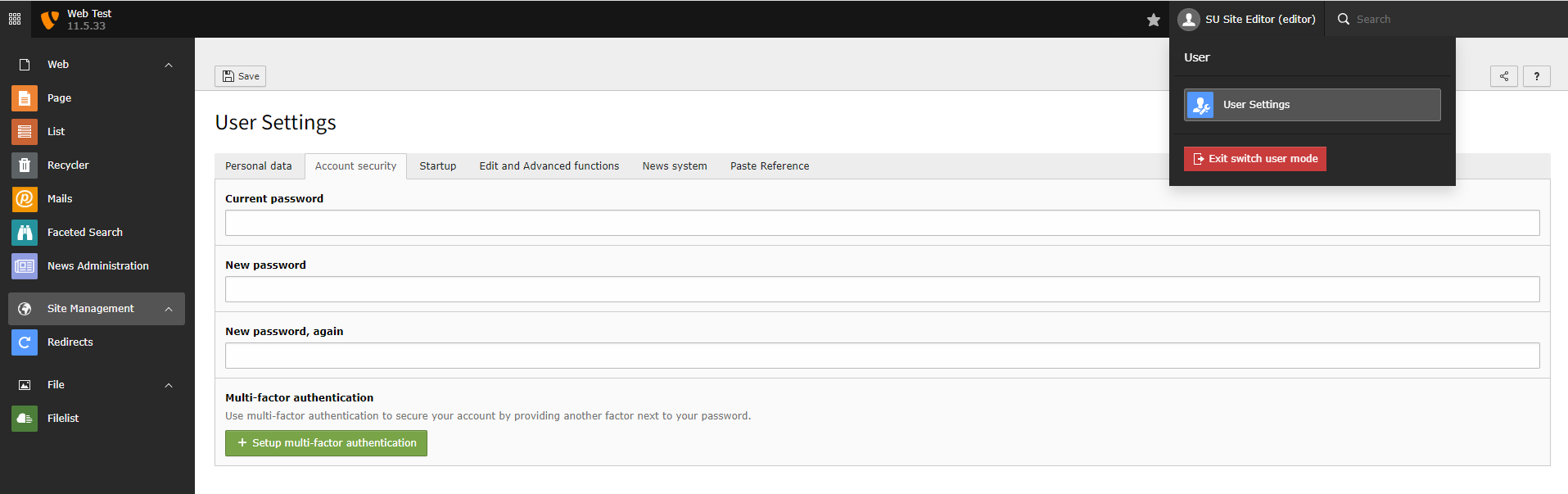
- Click on your name in the top user bar. Your name is located on the right-hand side of the top user bar.
- Select 'User Settings' from the drop-down menu.
- Go to the 'Account security' tab.
- Enter your current password and new password in the fields.
- Click Save.
Don't have a TYPO3 account?
Prior to logging in, you'll need to have an account created on the site you are wanting to edit. If you do not have an account already, you can request one by logging a job with the Web Development team. Please ensure you state in the job description, which site you need access to. If you require access to a specific part of site, please state this and the specific page(s).